
My Porsche
Porsche Cars North America, Inc.Auto & Vehicles
3.9200.00 Reviews
- Version
- 20.26.34-pcna+184861
- Installs
- 50.00K
- Age Rating
- Everyone
Screenshots
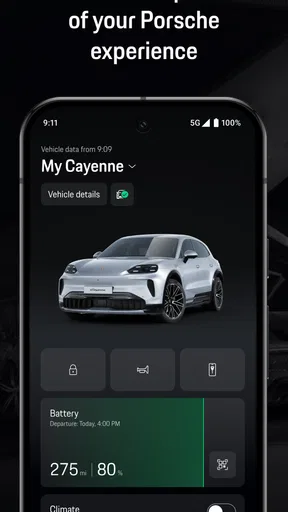
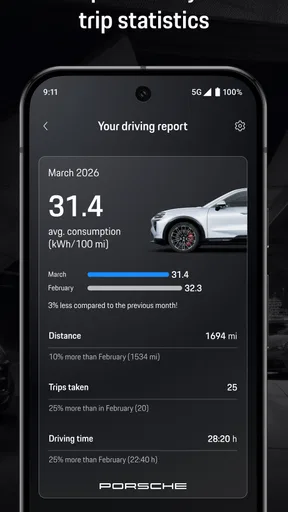
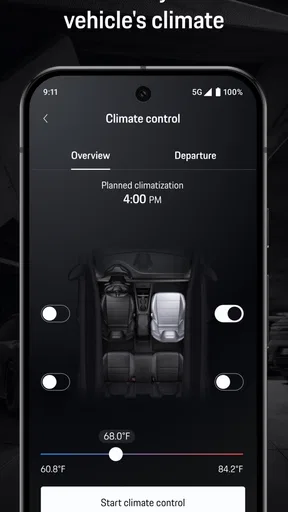
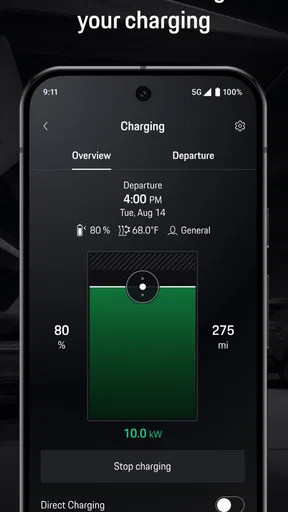
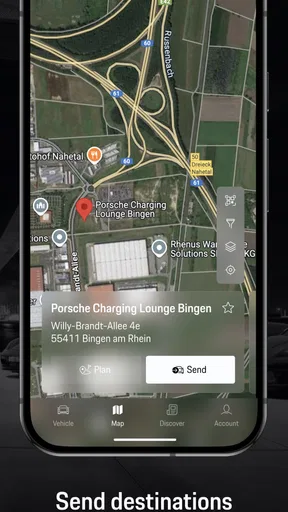
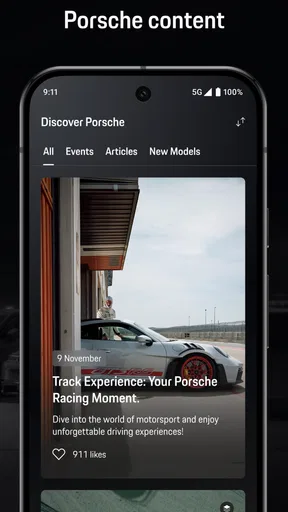
Our Review of My Porsche
 Analysis by Appyee
My first impression of My Porsche was that it feels less like a novelty app and more like a digital extension of Porsche ownership. That distinction matters. Many vehicle apps are exciting for a few days because they put a polished dashboard on your phone, then become something you open only when a notification tells you to. I approached this one with the same question I would ask a friend: after the first week, does it actually make owning and using a Porsche easier?
The answer depends heavily on what you expect from a companion app. If you want a general driving tool, a broad car marketplace, or a replacement for your phone’s navigation and communication apps, this is not the right place to start. Its purpose is narrower and more personal. It is built around the relationship between a Porsche driver and the vehicle, with the ownership experience—not just the act of getting from one place to another—at the center.
That focus is also why I found the app more convincing when I treated it as part of a routine. The useful question is not whether it can impress me once, but whether it helps me before a journey, during ownership tasks, and when I need to keep track of the car over time. As a free app in the Auto & Vehicles category, it has a relatively easy entry point, although its practical value naturally depends on having a compatible Porsche and being comfortable connecting a phone-based service to that ownership experience.
What My Porsche feels like during the first week
The first week is where the app makes its strongest case. The Porsche branding is immediately clear, and the interface is designed to feel like a dedicated companion rather than a generic automotive utility. That matters because a car is a high-involvement purchase: owners usually want more than a plain list of controls or service reminders. They want a clean place to return to when the car is not physically nearby.
I found the setup mindset important. Instead of opening the app casually and expecting it to explain everything, I would recommend approaching it as an ownership tool: sign in carefully, make sure the correct vehicle information is associated with the account, and spend time learning which areas are genuinely useful to you. The initial curiosity can otherwise turn into aimless tapping. A polished interface encourages exploration, but exploration is not the same as lasting value.
One realistic use case is preparing for a weekend trip. Before leaving, I would rather check the vehicle-related information in one Porsche-focused space than search through old emails, paper documents, and several unrelated phone apps. The benefit is not necessarily one dramatic feature. It is the reduction of small moments of uncertainty: remembering where ownership information lives, checking the current status of relevant items, and having a consistent starting point before heading out.
That is one of the app’s less obvious strengths: it can act as a mental bookmark for ownership. Even when I am not using it every day, I know where to begin when a Porsche-specific question comes up. This is different from a general automotive app, which may offer wider coverage but often treats every vehicle as a set of interchangeable fields. My Porsche feels more focused because the connection to the brand and the individual ownership context is the point.
The first-week appeal also comes from presentation. Porsche owners are likely to care about clarity and design, not only raw functionality, and the app generally fits that expectation. I would not choose it solely for visual polish, but the visual consistency makes returning to it less of a chore. A poorly organized ownership app can make simple tasks feel administrative; a well-considered one can make them feel like part of the ownership experience.
Still, I would not confuse a smooth beginning with a complete solution. The app is not a universal command center for every driving need. I would continue using established tools for broad navigation, messaging, maps, and general phone functions. My Porsche is most persuasive when it stays in its lane: Porsche-related information and ownership support, rather than attempting to replace the entire mobile ecosystem.
Who benefits most from the early experience
The best fit is a Porsche owner who values organization and wants a brand-specific place for vehicle-related tasks. It is also useful for someone who dislikes hunting through different sources whenever the car, its ownership details, or a related task becomes relevant. A person who enjoys keeping a close eye on the ownership experience will probably get more from it than someone who sees the car only as transportation.
I am less convinced it will satisfy a driver looking for a feature-packed daily utility. If your main requirement is traffic-aware routing, fuel-price comparison, broad maintenance tracking across several vehicle brands, or a single dashboard for a mixed household garage, a general-purpose automotive app may be more practical. The Porsche focus is an advantage for the right owner, but it is also a boundary.
Where the value survives from month to month
After the novelty fades, the app has to earn its place through recurring moments rather than constant entertainment. I think its month-to-month value comes from being available when ownership becomes administrative. That may sound less exciting than a spectacular feature, but it is often more useful. A companion app earns trust when it helps me remember, prepare, and verify without making me rebuild the same context every time.
My preferred way to use it would be in short sessions attached to existing habits. I might open it before a longer drive, when reviewing vehicle-related information, or when I am already thinking about an ownership task. This is better than forcing myself to check it every morning. Apps that demand attention without offering a reason quickly become background clutter, while apps connected to a real routine can remain useful even when opened only occasionally.
That leads to a practical tip: do not judge My Porsche by the number of times you open it. Judge it by whether the sessions you do make are easier and more coherent. A vehicle companion does not need to become a social feed or a daily destination. In my view, its ideal role is quiet availability. When I need Porsche-specific context, it should shorten the path to that information; when I do not, it should stay out of the way.
The app is also more valuable for owners who think in terms of the whole ownership cycle. Someone who has just taken delivery may use it to become familiar with the digital side of the car. A long-term owner may appreciate having a stable reference point instead of relying entirely on memory. A driver preparing for a trip may use it as part of a pre-drive checklist. These are different situations, but they share a common benefit: the app connects occasional tasks that otherwise feel scattered.
Compared with the usual alternatives, the distinction is clear. A manufacturer-focused app can provide a more tailored ownership context than an independent car-management tool, while an independent tool may be better for combining multiple brands, tracking household vehicles, or building a detailed maintenance history in one place. I would not expect My Porsche to win every comparison. I would choose it when Porsche-specific continuity matters more than broad compatibility.
There is a trade-off here that is easy to miss. A focused app can feel simpler because it avoids unrelated features, but simplicity may also mean fewer tools for unusual situations. If you regularly manage several cars, lend vehicles to family members, or want one universal record for repairs and expenses, the Porsche app may need to sit alongside another service. That is not automatically a flaw; it is a reminder that brand-specific convenience and all-purpose coverage are different goals.
A useful routine for recurring value
I would build a small routine around three moments: before an important journey, when an ownership detail needs attention, and when I want to review the vehicle relationship rather than simply drive. Keeping those moments separate prevents the app from becoming a source of needless checking. It also makes it easier to notice whether it is genuinely helping or merely occupying storage space.
Another useful habit is to keep the app updated rather than treating installation as a one-time event. The current version is listed as 20.26.34-pcna+184861, and vehicle companion apps can change in ways that affect reliability or layout. I would not update blindly before an important trip, though. My preference is to open the app after an update, confirm that the vehicle context still appears correctly, and only then rely on it as part of a journey-preparation routine.
That small check is a realistic long-term safeguard. A companion app is most frustrating when the owner discovers a sign-in issue, an outdated screen, or a missing connection at the exact moment the information is needed. Spending a minute on routine verification is less glamorous than exploring the interface, but it is more likely to preserve the app’s practical value.
How much maintenance the app demands
The maintenance burden is not only about phone storage or updates. It is also about account hygiene, keeping vehicle information current, and knowing when the app is helpful rather than assuming it is the final authority for every issue. I prefer apps that make these responsibilities feel manageable, and My Porsche is easiest to live with when I treat it as one layer of ownership rather than the entire ownership system.
There is a difference between maintaining an app and depending on it too much. I would keep the vehicle’s official documentation and any important service information accessible through the appropriate channels as well. A phone app is convenient, but convenience should not encourage me to forget where essential records or support routes are located. The app can organize the digital side of ownership; it should not become the only place I know how to look.
Account setup is another area where patience pays off. If the wrong vehicle or ownership context is selected, the experience can feel confusing even when the interface itself is well designed. I would double-check the account details at the beginning and avoid casually creating duplicate profiles. That is a non-obvious but important ownership tip: a few careful minutes during setup can prevent repeated confusion later.
Phone compatibility is straightforward but worth noting. The app requires at least Android 10, so owners of older Android devices should consider their phone before planning around it. On a supported device, I would still pay attention to battery behavior, notifications, and background activity over several days rather than judging those factors from one session. Automotive apps often become more noticeable when they are allowed to remain active in the background.
I also think about maintenance in terms of attention. If the app sends information that I do not understand or cannot act on, it can create more work than it removes. The best approach is to decide which notifications and reminders deserve immediate attention and which can wait for a convenient review. This keeps the app from turning normal ownership into a stream of interruptions.
Support expectations should be realistic as well. A manufacturer’s app may be the right starting point for Porsche-related digital matters, but not every mechanical concern belongs inside a phone interface. If something appears urgent or safety-related, I would use the appropriate official assistance or service route instead of trying to diagnose the situation through the app. That boundary is especially important for owners who are tempted to treat a polished digital dashboard as a substitute for professional help.
Where fatigue can set in
The main source of fatigue is the gap between what an owner imagines a premium vehicle app should do and what they actually need from it. The first launch can create high expectations because the brand carries considerable emotional weight. If the app does not produce a meaningful reason to return every week, some users may decide that it is unnecessary—even if it remains useful for occasional tasks.
I also see a risk in duplication. Most drivers already have preferred tools for navigation, calendars, reminders, messaging, and general vehicle records. My Porsche has to justify itself against those familiar habits. It does so best when it provides Porsche-specific context that a generic alternative cannot match. If a user opens it and finds only information they already manage more efficiently elsewhere, the app may feel like another account and another notification channel.
That is why I would skip installing it on a secondary phone unless I had a clear reason. Convenience disappears when the app is not on the device I actually carry. Similarly, I would not recommend it to someone who rarely interacts with digital ownership tools and does not want another place to check. The free price removes a financial barrier, but it does not remove the cost of attention.
Another possible frustration is that the experience can feel dependent on context. The app makes the most sense when the user has a direct relationship with a Porsche and wants to manage that relationship digitally. Without that context, the interface has limited appeal. It is not an automotive encyclopedia or a general-purpose driver community, so curiosity alone may not sustain interest.
For owners of more than one vehicle, the trade-off becomes sharper. A general garage-management app may provide a more unified view, even if it lacks the Porsche-specific feel. I would use My Porsche for the Porsche itself and a broader tool for the household fleet if necessary. Trying to force one app to handle both jobs could create unnecessary duplication and disappointment.
Performance and reliability also matter more in a companion app than in a casual app. A small delay or a sign-in interruption may be tolerable when browsing, but it becomes irritating when I am standing beside the car or preparing to leave. My advice is to test the app during calm moments, not for the first time when time is tight. Learn where the important information is before you need it, and keep a backup habit for essential tasks.
When another option is better
I would choose a general automotive app for multi-brand tracking, shared household records, or detailed expense management. I would choose the phone’s established navigation tools for broad route planning. I would rely on official service channels for urgent mechanical or safety questions. My Porsche is the better choice when the goal is a Porsche-centered digital ownership experience, not when the goal is maximum coverage across unrelated driving needs.
This distinction makes the app easier to evaluate fairly. It does not need to replace every alternative to be worthwhile. It needs to offer enough brand-specific convenience that opening it feels more direct than switching between generic tools. For a committed Porsche owner, that can be a meaningful advantage. For everyone else, the specialization may feel restrictive.
My long-term verdict
My Porsche earns lasting space on my phone when I use it intentionally rather than habitually. Its strongest quality is focus: it gives Porsche ownership a dedicated digital home and can make occasional tasks feel more organized. The experience is most convincing for owners who appreciate continuity, presentation, and a single Porsche-oriented starting point before journeys or ownership decisions.
Its limitations are equally clear. It is not a universal driving assistant, a complete garage manager, or a substitute for every official and practical ownership channel. The app can also lose its appeal if the user expects constant novelty. Once the initial discovery period ends, its value depends on whether it fits naturally into real routines. That is a reasonable standard, and in my experience it is the right one for judging any vehicle companion.
The app is free and rated for Everyone, which makes trying it low-risk for eligible owners. It was released on October 28, 2021, and has built a visible user base, with over fifty thousand installs and an average rating of 3.9. I read those figures as signs of a useful but not universally perfect experience: enough adoption to show that the concept has staying power, while the rating suggests that individual expectations and real-world setup can affect satisfaction.
Developer support comes from Porsche Cars North America, Inc., which reinforces the app’s regional and brand-specific character. I would keep that in mind when deciding whether it belongs in my regular toolkit. The closer my ownership situation is to the experience the app is designed around, the more likely its focused approach will feel helpful rather than narrow.
My final recommendation is simple. If you own a compatible Porsche and want a dedicated digital companion for the ownership side of the car, I think it is worth installing and testing through a complete routine rather than judging it after one launch. Give it a week to settle, then keep it only if it saves time or reduces uncertainty during the month. The lasting value is in dependable ownership support, not endless novelty. If your needs are broader than Porsche ownership, pair it with a general automotive tool or skip it in favor of one app that covers your whole garage. For the right driver, though, My Porsche can become a quiet, useful part of the relationship with the car.
Verdict
Strengths of My Porsche
- Quick access to vehicle status, range, and maintenance information.
- Remote locking, climate control, and charging features are convenient.
- Service appointments and dealer communication are easy to manage.
- Porsche-specific content and vehicle documentation are well organized.
- Useful trip planning and destination features for compatible models.
Limitations of My Porsche
- Many remote features require a compatible Porsche model and paid services.
- Some functions may respond slowly depending on vehicle connectivity.
- Battery and location data can occasionally take time to refresh.
- The app offers limited value if you do not own or regularly use a Porsche.
- Certain features and availability vary by country, model, and subscription.
Similar Picks in This Category
View All
Android Auto
Google LLC4.1

maxim — order a taxi & food
PT. SITO4.7

Штрафы ГИБДД: проверка с фото
Pays LLC – Штрафы ГИБДД4.7

Номерограм – проверка авто
Авто Ассист4.8

Дром Авто
Дром4.9

Frequently Asked Questions
What is My Porsche, and what can I do with the app?
My Porsche is the official companion app for Porsche owners and drivers. After signing in and adding an eligible vehicle, you can view important vehicle information, check selected status details, manage service-related matters, find Porsche Centres, and access brand or ownership resources. The exact features depend on your Porsche model, country, equipment, connected services, and whether your vehicle supports the required online functions.
Is My Porsche compatible with every Porsche vehicle?
No. Compatibility and available functions vary considerably between models, model years, markets, and installed equipment. Newer connected Porsche vehicles generally offer more remote information and digital services, while older cars may provide only basic account, service, or dealer features. Before downloading, check the app listing and Porsche’s official compatibility information, and make sure your vehicle is properly linked to a Porsche ID.
Do I need a Porsche ID or an active subscription to use My Porsche?
Most useful features require a Porsche ID and a verified account. Depending on your vehicle and region, some connected services may also require activation, a paid subscription, or an active Porsche Connect agreement. Account verification and vehicle ownership confirmation can take additional steps, particularly for a recently purchased used car. Basic app installation may be free, but connected services are not necessarily included.
Can I control or monitor my Porsche remotely through the app?
For supported vehicles and markets, My Porsche may let you check selected vehicle information remotely and use certain connected functions, such as viewing the car’s location, range, charging status, or other status data. Remote controls are not universal and may be limited by model, safety rules, connectivity, privacy settings, and subscription status. Commands can also fail when the vehicle has poor network coverage or is offline.
What permissions and internet connection does My Porsche require?
My Porsche needs an internet connection to synchronize vehicle data and communicate with Porsche’s online services. Depending on the features you use, it may request access to notifications, location, Bluetooth, or other device functions. Location access can support navigation, vehicle-finding, and dealer-related tools, while notifications can report charging or service updates. Review permissions carefully, and remember that data availability may be delayed.
